


Check Valid Phone by BTRC, Legal Mobile IMEI Justify 2022, Check IMEI from BTRC – Verify Your Mobile Phone! Bangladesh Telecommunication Regulatory Commission already started to prevent illicit mobile phone selling and import. So, they started a new system.
All handsets will be covered under registration. Now, the recent new model mobile phone that has the authority or licenses to sell the mobile phone is already in the listed of BTRC databases. So, this is a very important thing to verify a new model mobile phone before purchase. So, you can easily check this easily.
Now illegal, unauthorized, forbidden phones can not be used in this country. There are three categories of this IMEI. There one is White. That means, Your phone is legal and it is permitted by the government. Such as, if you purchase from any smartphone Show Room that has legal authority.
Another is Gray. That means this phone brings from another country that is not permitted to use in this country. But you can use that phone by making it white during the BTRC instructions period otherwise not. Such as, If your relative works in another country he/she sent a mobile phone for you.
And the Blacklist is black. That means you will never be able to use that smartphone in this country. Such as the speculation businessman. Those who import illegal phones with tax evasion and subsequently sell them.
How to Check Legal Mobile Phone IMEI in Bangladesh
Buying a new mobile phone is a big decision, especially when there are so many unofficial and imported handsets available in the market.
Before buying a phone in Bangladesh, it is a good idea to check its IMEI number and verify whether the handset is properly registered and recognized by the relevant system.
In this guide, we will explain how to find your phone’s IMEI number, how to check its status, and what you should do if the IMEI information does not look correct.
What Is an IMEI Number?
IMEI stands for International Mobile Equipment Identity.
It is a unique identification number associated with a mobile handset. A typical mobile phone has a 15-digit IMEI number.
The IMEI is useful for identifying a particular mobile device on a cellular network.
If your phone supports two SIM cards, it may have two different IMEI numbers—one for each SIM slot.
For that reason, if you have a dual-SIM phone, make sure you check the IMEI associated with the SIM slot you are using.
How to Find Your Phone’s IMEI Number
The easiest way to find the IMEI number is to open the phone dialer and enter:
*#06#
Your phone should display the IMEI number or numbers associated with the device.
You can also find the IMEI in other places depending on your phone model, such as:
- Phone Settings
- About Phone
- Original phone box
- Purchase documents
- SIM tray on some devices
If your phone has two SIM slots, check both IMEI numbers.
How to Check Whether a Mobile Phone Is Legal in Bangladesh
Before buying a mobile phone, you should verify its IMEI through the official system or method provided by the Bangladesh Telecommunication Regulatory Commission (BTRC).
The purpose of IMEI verification is to determine whether the handset’s IMEI is recognized in the relevant database and whether there are any issues associated with the device.
BTRC maintains systems and processes related to IMEI verification and mobile handset regulation. Its published documents also refer to IMEI verification as an official service.
Check IMEI Before Buying a New Phone
If you are buying a phone from a shop, don’t wait until you get home to check the IMEI.
You can check it before completing the purchase.
First, enter:
*#06#
Then compare the IMEI displayed on the phone with the IMEI printed on the box or provided with the handset documentation.
If the numbers do not match, ask the seller about the difference before purchasing the phone.
For a dual-SIM phone, compare both IMEI numbers where applicable.
Why Should You Check the IMEI?
Checking the IMEI can help you avoid several problems.
For example, it can help you identify:
- Incorrect IMEI information
- A handset whose IMEI does not match its packaging
- Potentially problematic imported devices
- Duplicate or suspicious IMEI information
- Devices that may not be properly recognized by the relevant system
BTRC’s technical guidelines also require cellular operators to support IMEI barring and prohibit duplication of IMEI in their networks.
This is one reason why checking the IMEI is important when buying a handset.
How to Check IMEI on Android Phones
The exact menu can vary between manufacturers, but you can usually find the IMEI by going to:
Settings → About Phone → Status / IMEI Information
The quickest method is still:
Dial *#06#
If your phone has two SIM slots, you may see two IMEI numbers.
How to Check IMEI on iPhone
On an iPhone, you can usually find the IMEI from:
Settings → General → About
Scroll down until you find the IMEI information.
You can also use the phone’s dialer and enter:
*#06#
Keep the IMEI private when sharing screenshots or photos online.
What Is NEIR?
NEIR stands for National Equipment Identity Register.
It is related to the identification and management of mobile devices using their IMEI information.
BTRC has described NEIR as a system intended to support handset registration and management, with IMEI databases and mobile network equipment identity registers forming part of the broader system.
Because the status and procedures surrounding handset registration can change, always follow the latest instructions provided through official BTRC channels.
What If My IMEI Is Not Found?
If an IMEI check does not return the expected information, don’t immediately assume that the phone is fake.
There can be several reasons for a problem, including:
- The IMEI was entered incorrectly.
- You checked the wrong IMEI on a dual-SIM phone.
- The handset information has not been updated yet.
- The phone has a registration issue.
- The official system is temporarily unavailable.
- The handset requires additional verification.
First, check the 15-digit IMEI carefully.
If the problem continues, contact the seller and use the official BTRC support or verification process.
What If the IMEI on the Phone and Box Are Different?
This is something you should take seriously.
If the IMEI shown by the phone does not match the IMEI printed on the box or provided in the purchase documents, ask the seller to explain the difference.
Do not simply assume that the difference is harmless.
For a dual-SIM phone, remember that two different IMEI numbers can be normal. The important thing is to make sure you understand which IMEI belongs to which SIM slot.
What If a Phone Has a Duplicate IMEI?
A duplicated IMEI can be a serious issue because an IMEI is intended to identify a specific mobile device.
BTRC’s published cellular-mobile guidelines state that duplication of IMEI should not be allowed in the operator network.
If you suspect that your phone has a duplicated or otherwise problematic IMEI, contact the seller and seek assistance through the appropriate official channels.
Avoid trying to change or manipulate the IMEI yourself.
How to Check a Used Phone Before Buying
If you are buying a second-hand phone, checking the IMEI is especially important.
Before paying, do the following:
- Dial
*#06#. - Write down the IMEI number.
- Check the IMEI through the appropriate official verification method.
- Compare the IMEI with the phone box if available.
- Check both IMEIs on a dual-SIM device.
- Make sure the phone’s model information looks correct.
- Ask the seller for a purchase receipt.
- Keep the receipt after buying the phone.
Taking a few minutes to perform these checks can save you from problems later.
Do Not Change the IMEI Yourself
You may find websites or videos claiming that you can change or repair an IMEI using special software.
You should not attempt to modify an IMEI simply to bypass a registration or network-related problem.
If you believe there is an error with your phone’s IMEI, use the proper official process or contact an authorized service provider.
What to Do If Your Phone Has a Problematic IMEI
If your handset appears to have an IMEI-related problem, start with the seller.
Keep your:
- Purchase receipt
- Phone box
- IMEI information
- Model information
- Warranty documents
Then contact the appropriate official support channel if the issue cannot be resolved by the seller.
BTRC also maintains official complaint and customer-service systems for telecommunications-related issues.
Important Things to Remember
Before buying a mobile phone in Bangladesh, remember these simple checks:
Check the IMEI → Compare the numbers → Verify the handset status → Keep the receipt
Do not rely only on the seller’s statement that a phone is “official” or “legal.”
A proper IMEI check gives you additional information before making the purchase.
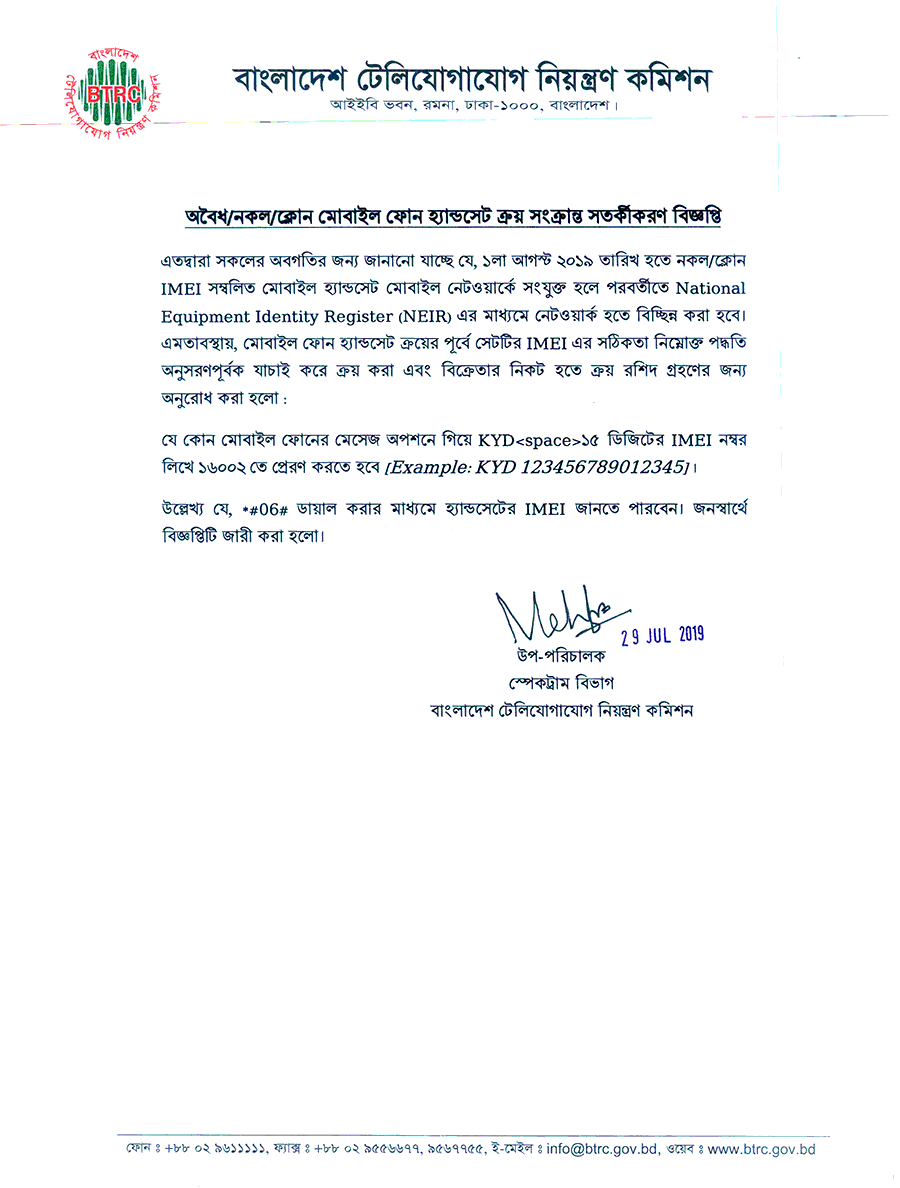
Notice Regarding Buying Selling of Illegal Counterfeit Clone Mobile Phone Handset:
The main cause is to reduce mobile phone-centric crime and sell handsets, illegal importation, and ban fake handsets. On January 22, 2019, The International Mobile Device Identification (IMEI) Number Database has been declared. Now all kinds of prohibited mobile phones can be detected, and even stolen mobile phones can be locked.
How to Check Valid Phone IMEI by BTRC?
How to do an Official phone check in Bangladesh? You can check your phone IMEI is valid or illegal by BTRC. So, you have to follow these steps. Before checking Valid Phone information, you must need your mobile phone IMEI. So, at first ready to note your IMEI somewhere. If you don’t know your phone IMEI number, you must have to type dialer *#06# from your phone. But remember that no need to dial. Just type those in the dialer then you will see your IMEI.
- Now go to your message options and type “
KYD<space>IMEI Number“ - Then send it to “
16002“
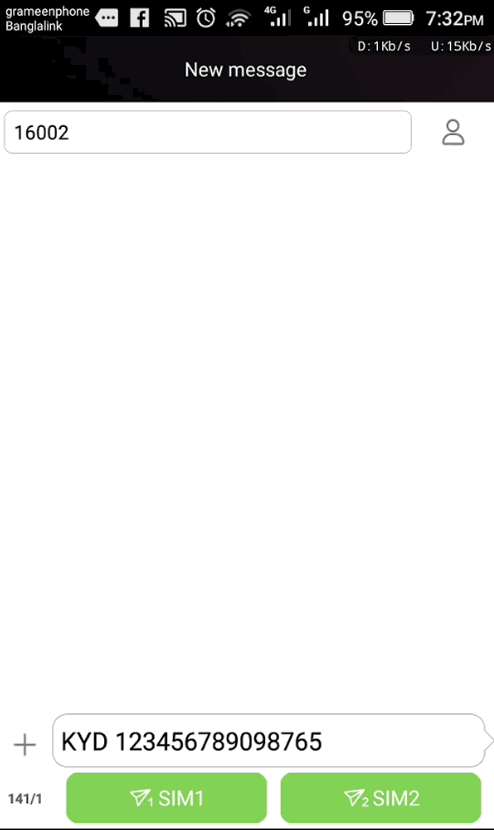
Then you will get your information in the feedback if you can complete this all steps properly.
For example: KYD 123458789658547 and send it to 16002.
Many People also search for:
- how to check mobile number is active or not
- how to check if a phone number is real
- check phone number free
- mobile number active status
- bulk phone number validation
- BTRC mobile phone registration
- BTRC mobile registration
- mobile registration Bangladesh
- how to register an IMEI number in Bangladesh
- BTRC mobile set registration
- BTRC notice about the unofficial phone
- check the phone number owner
- international phone number validation
- BTRC IMEI registration
- BTRC IMEI check SMS
- the fake phone number for verification
- How to check BTRC IMEI database?
Frequently Asked Questions
What is IMEI?
IMEI stands for International Mobile Equipment Identity. It is a unique identifier used for a mobile device.
How can I see my phone’s IMEI?
Dial *#06# from your phone. You can also find it under the phone’s settings.
How many IMEI numbers does a dual-SIM phone have?
A dual-SIM phone may have two IMEI numbers, normally one for each SIM slot.
Is it important to check IMEI before buying a phone?
Yes. Checking the IMEI can help you identify possible registration, identity, or handset-related issues before purchasing the device.
What should I do if my IMEI does not match the box?
Ask the seller to explain the difference before purchasing the phone. Do not ignore a mismatch without understanding why it exists.
What does a duplicate IMEI mean?
It means the same IMEI may be associated with more than one device. BTRC’s guidelines state that IMEI duplication should not be allowed in cellular operator networks.
What is NEIR?
NEIR means National Equipment Identity Register. It is associated with the management and identification of mobile handsets using IMEI information.
Can I change my phone’s IMEI?
You should not attempt to modify an IMEI to bypass registration, network restrictions, or other controls. If you have an IMEI problem, use the appropriate official support process.
What should I do if my phone is not recognized?
First, verify that you entered the correct 15-digit IMEI. If the problem continues, contact the seller and use the latest official BTRC verification or support procedure.
Can I check a used phone’s IMEI?
Yes. In fact, checking the IMEI is particularly useful when buying a used phone.
Final Words
Before buying a new or used mobile phone, spending a few minutes checking the IMEI is worth it.
Dial *#06#, note the IMEI number, compare it with the phone’s packaging and purchase documents, and verify the handset through the appropriate official system.
If something does not match or the IMEI status looks unusual, ask the seller for an explanation before completing the purchase.
For the latest rules and verification procedure, always rely on the current information published by BTRC, because mobile handset registration and IMEI-related procedures can change over time.